---
title: Why Do My Podcast Show Notes Not Look Right In Different Listening Apps?
description: If your podcast’s show notes don’t look right on Spotify, Apple Podcasts, and other podcast players, this article explains how to fix it.
---
[Skip to content](https://help.cohostpodcasting.com/why-do-my-podcast-show-notes-not-look-right-in-different-listening-apps#main-content)
[Submit a Support Request](https://help.cohostpodcasting.com/kb-tickets/new?hsLang=en-us)
[](https://www.cohostpodcasting.com/?utm_source=hubspot&utm_medium=banner&utm_campaign=knowledge-base)
Open main navigation
Close main navigation
- [Submit a Support Request](https://help.cohostpodcasting.com/kb-tickets/new)
How can we help you?
- There are no suggestions because the search field is empty.
1. [CoHost Help Center](https://help.cohostpodcasting.com/?hsLang=en-us)
2. [Troubleshooting](https://help.cohostpodcasting.com/troubleshooting?hsLang=en-us)
February 27, 2025
# Why Do My Podcast Show Notes Not Look Right In Different Listening Apps?
## If your podcast’s show notes don’t look right on Spotify, Apple Podcasts, and other podcast players, learn how to fix it in the steps below.
If your podcast show notes look correct in CoHost but not in listening apps, there are two main causes:
1. Pasting content from external applications (such as Word, Google Docs, or Apple Notes) may carry **hidden HTML formatting** that isn’t visible in our editor but can affect how your podcast appears in apps.
2. **Different podcast apps interpret HTML in their own way,** and certain formatting elements may not display properly in Apple Podcasts and Spotify.
Below we’ll go over how to fix these two common issues:
### How to copy and paste show notes from other applications
If you write your show notes in other applications – like Word or Google Docs – you won’t just be copying and pasting the text you see, but also the HTML and styling code that goes along with it.
Your show notes may look correct when you put them into CoHost’s editor, but it can cause rendering problems when listening apps like Apple Podcasts and Spotify pick it up.
To avoid this, we suggest **copying and pasting as plain text into CoHost and doing any additional formatting there.**
#### **PC users: How to paste plain text content**
- Copy your show notes from your application of choice (Word, Google Docs, etc)
- Open [Notepad](https://play.google.com/store/apps/details?id=com.atomczak.notepat&hl=en_GB&pli=1) and paste your show notes. This will get rid of the formatting and convert it to plain text
- Copy the plain text from Notepad
- Open CoHost and paste the plain text into **“Episode Description & Shownotes”**
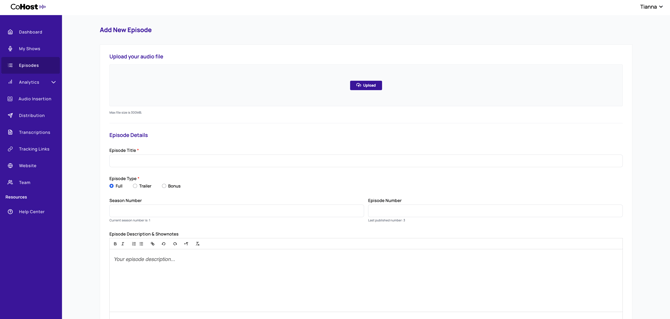
- Click “**Save”**
#### **Mac users: How to paste plain text content**
- Copy your show notes from your application of choice (Word, Google Docs, etc)
- Open [TextEdit](https://apps.apple.com/us/app/textedit-text-editor/id1070883678) and paste your show notes
- Go to Format \> Make Plain Text (or Shift Command T) in the top menu. This will convert the text to plain text
- Copy the plain text from the TextEdit document
- Open CoHost and paste the plain text into **“Episode Description & Shownotes”**

- Click “**Save”**
### Other formatting limitations in Apple Podcasts and Spotify
The two primary podcast listening apps have formatting restrictions for show notes, which include:
- **Apple Podcasts** does not support bold or italic text and, in the latest version, has removed support for bullet points and hyperlinks. To ensure readability, use line breaks instead of bullet points and include URLs as plain text — Apple will automatically hyperlink them.
- **Spotify** allows bullet points and hyperlinked text but does not support bold or italic formatting.
To learn more, we suggest checking out this [Podnews](https://podnews.net/article/html-episode-notes-in-podcast-rss) article.
- [Getting Started with CoHost](https://help.cohostpodcasting.com/getting-started-with-cohost?hsLang=en-us)
- [Create, import, and modify my podcast](https://help.cohostpodcasting.com/create-import-and-modify-my-podcast?hsLang=en-us#main-content)
- [Podcast Migration](https://help.cohostpodcasting.com/create-import-and-modify-my-podcast?hsLang=en-us#podcast-migration)
- [Editing/Updating My Podcast](https://help.cohostpodcasting.com/create-import-and-modify-my-podcast?hsLang=en-us#editing-updating-my-podcast)
- [Create, publish, and edit my episodes](https://help.cohostpodcasting.com/create-publish-and-edit-my-episodes?hsLang=en-us#main-content)
- [Episode Set Up](https://help.cohostpodcasting.com/create-publish-and-edit-my-episodes?hsLang=en-us#episode-set-up)
- [Episode Publishing](https://help.cohostpodcasting.com/create-publish-and-edit-my-episodes?hsLang=en-us#episode-publishing)
- [Episode Editing](https://help.cohostpodcasting.com/create-publish-and-edit-my-episodes?hsLang=en-us#episode-editing)
- [Distribute my podcast](https://help.cohostpodcasting.com/distribute-my-podcast?hsLang=en-us#main-content)
- [Podcast Fundamentals](https://help.cohostpodcasting.com/distribute-my-podcast?hsLang=en-us#podcast-fundamentals)
- [Listening Apps](https://help.cohostpodcasting.com/distribute-my-podcast?hsLang=en-us#listening-apps)
- [RSS Feed](https://help.cohostpodcasting.com/distribute-my-podcast?hsLang=en-us#rss-feed)
- [General](https://help.cohostpodcasting.com/general?hsLang=en-us)
- [Grow my podcast](https://help.cohostpodcasting.com/grow-my-podcast?hsLang=en-us#main-content)
- [How To's](https://help.cohostpodcasting.com/grow-my-podcast?hsLang=en-us#how-tos)
- [Tips & Best Practices](https://help.cohostpodcasting.com/grow-my-podcast?hsLang=en-us#tips-best-practices)
- [Managing my CoHost account](https://help.cohostpodcasting.com/managing-my-cohost-account?hsLang=en-us#main-content)
- [Adding Features](https://help.cohostpodcasting.com/managing-my-cohost-account?hsLang=en-us#adding-features)
- [Billing](https://help.cohostpodcasting.com/managing-my-cohost-account?hsLang=en-us#billing)
- [Team Members](https://help.cohostpodcasting.com/managing-my-cohost-account?hsLang=en-us#team-members)
- [Multi-Show Management](https://help.cohostpodcasting.com/managing-my-cohost-account?hsLang=en-us#multi-show-management)
- [Prefix](https://help.cohostpodcasting.com/managing-my-cohost-account?hsLang=en-us#prefix)
- [Free Trial](https://help.cohostpodcasting.com/managing-my-cohost-account?hsLang=en-us#free-trial)
- [Troubleshooting](https://help.cohostpodcasting.com/troubleshooting?hsLang=en-us)
- [Understanding my CoHost features](https://help.cohostpodcasting.com/understanding-my-cohost-features?hsLang=en-us#main-content)
- [CoHost Tracking Links](https://help.cohostpodcasting.com/understanding-my-cohost-features?hsLang=en-us#cohost-tracking-links)
- [Automatic Websites](https://help.cohostpodcasting.com/understanding-my-cohost-features?hsLang=en-us#automatic-websites)
- [Automatic Transcriptions](https://help.cohostpodcasting.com/understanding-my-cohost-features?hsLang=en-us#automatic-transcriptions)
- [Audio Insertion](https://help.cohostpodcasting.com/understanding-my-cohost-features?hsLang=en-us#audio-insertion)
- [Websites](https://help.cohostpodcasting.com/understanding-my-cohost-features?hsLang=en-us#websites)
- [Show Analytics](https://help.cohostpodcasting.com/understanding-my-cohost-features?hsLang=en-us#show-analytics)
- [Understanding podcast analytics](https://help.cohostpodcasting.com/understanding-podcast-analytics?hsLang=en-us#main-content)
- [Growth Metrics](https://help.cohostpodcasting.com/understanding-podcast-analytics?hsLang=en-us#growth-metrics)
- [General Analytics](https://help.cohostpodcasting.com/understanding-podcast-analytics?hsLang=en-us#general-analytics)
- [Engagement Metrics](https://help.cohostpodcasting.com/understanding-podcast-analytics?hsLang=en-us#engagement-metrics)
- [Audience Insights](https://help.cohostpodcasting.com/understanding-podcast-analytics?hsLang=en-us#audience-insights)
- [CoHost Updates](https://help.cohostpodcasting.com/cohost-updates?hsLang=en-us)
[](https://www.cohostpodcasting.com)
Robina Avenue, York, ON
[mailto:email@email.com](mailto:email@email.com)
Copyright © 2024, cohostpodcasting.com