
When creating a new Tracking Link within your CoHost account, you can either provide listeners a list of listening app options for them to select or send them directly to your desired app.
Sending listeners directly to your desired listening app is done through Direct Links within our Tracking Links feature.
To achieve this, simply head to your Tracking Links dashboard.
Once here, create a new Tracking Link and add the link information, like whether you’re promoting the overall show or a specific episode.
Once at the “Add Listening Apps” stage, check off “Skip landing page and send listeners directly to one app.”
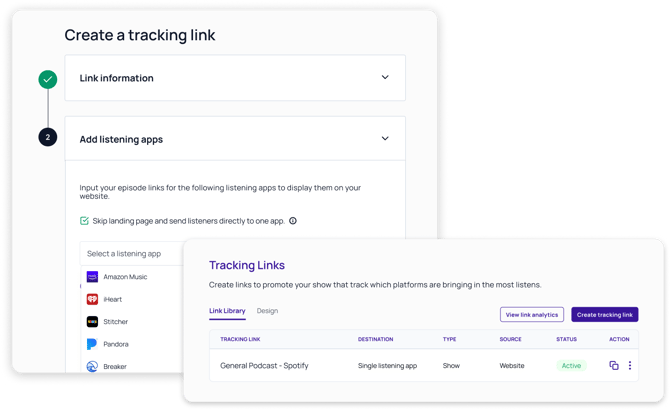
By selecting this checkbox, you can add only one listening app destination for audiences to reach. Once you’ve added your desired listening app, select “Generate Tracking Link(s).”
Your new Tracking Link using Direct Links has now been created!
Within your Tracking Links dashboard, you can see which of your links have been created using this feature since the destination is labeled as a “Single Listening App.”
Use Cases for Direct Links
1. Embedding podcast links on your website
If your show is promoted through your website, Direct Links make it easy for visitors to start listening instantly.
Instead of sending them to a landing page to choose a platform, you can embed tracking links directly in the listening app icons on your site (Spotify, Apple Podcasts, Amazon Podcasts, etc.). When a visitor clicks an icon, they’ll be taken straight to that app while you still capture full tracking data on clicks and downloads.
2. Social media campaigns or newsletters
When you share your podcast through social posts or newsletters, you often have limited space to capture attention.
Direct Links simplify the listener journey by removing an extra step and taking them straight to their preferred platform. This keeps engagement high while allowing you to track which platforms or channels drive the most traffic and downloads.
3. Platform-specific promotions
If you’re running a campaign that highlights one specific listening app, for example, a limited-time Spotify promotion, Direct Links let you send audiences directly there. This is especially useful when coordinating with platform partners or promoting exclusive content.
4. Paid ads or sponsorship placements
In performance marketing campaigns or sponsorship partnerships, every click matters.
Using Direct Links minimizes drop-offs caused by landing pages, ensuring listeners are sent directly to your target app. You’ll still receive analytics on campaign performance through your Tracking Links Analytics dashboard.
5. Client or internal reporting for agencies
For agencies managing multiple shows, Direct Links help demonstrate the effectiveness of campaign placements.
You can share data on where clicks came from, which platforms performed best, and how each campaign contributed to driving new listens, all without adding friction for the listener.
Leveraging CoHost’s Direct Links Feature
Direct Links make it easier than ever to guide your audience straight to your podcast while keeping full visibility into your marketing performance. Whether you’re embedding links on your website, sharing on social, or running ad campaigns, Direct Links remove extra clicks and help you deliver a smoother listener experience.
If you’d like to learn more about creating or managing Tracking Links in CoHost, visit our Tracking Links Overview article or reach out to our support team for additional guidance.