---
title: How Do I Claim My Show on Apple Podcasts Connect via CoHost?
description: Learn how to claim your show on Apple Podcasts Connect via CoHost.
---
[Skip to content](https://help.cohostpodcasting.com/how-to-claim-my-show-on-apple-podcasts-connect-via-cohost#main-content)
[Submit a Support Request](https://help.cohostpodcasting.com/kb-tickets/new?hsLang=en-us)
[](https://www.cohostpodcasting.com/?utm_source=hubspot&utm_medium=banner&utm_campaign=knowledge-base)
Open main navigation
Close main navigation
- [Submit a Support Request](https://help.cohostpodcasting.com/kb-tickets/new)
How can we help you?
- There are no suggestions because the search field is empty.
1. [CoHost Help Center](https://help.cohostpodcasting.com/?hsLang=en-us)
2. [Getting Started with CoHost](https://help.cohostpodcasting.com/getting-started-with-cohost?hsLang=en-us)
February 3, 2026
# How Do I Claim My Show on Apple Podcasts Connect via CoHost?
## Learn how to claim your podcast on Apple Podcasts Connect using CoHost. Generate a verification token, add it to CoHost, and you’re good to go within 24 hours.
Follow the steps below to claim your podcast on Apple Podcasts Connect using CoHost.
### **Step 1: Log in to Apple Podcasts Connect**
[Sign in](https://podcasters.apple.com/) to your Apple Podcasts Connect account.
### **Step 2: Claim an Existing Show**
Scroll to the bottom of the page and, under **More Actions**, click **Claim Existing Show**.
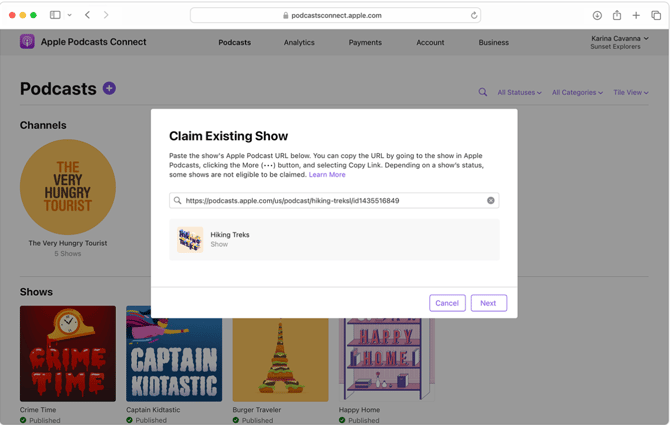
### **Step 3: Enter Your Show URL**
Paste the **Apple Podcasts show URL** for the podcast you want to claim, then click **Next**.
### **Step 4: Generate a Verification Token**
Follow the prompts to locate your show and generate a verification token.
**Note:** The token is valid for **7 days**.
### **Step 5: Add the Token in CoHost**
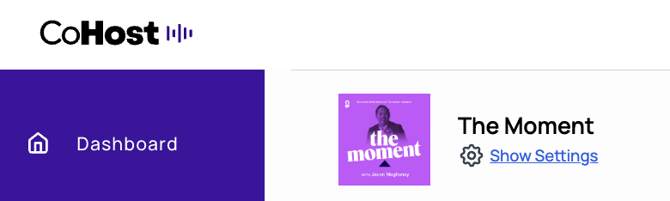
1. In CoHost, navigate to **Show Settings** at the top left-hand side.
2. Scroll to the bottom of the page.
3. Locate the **Apple Podcasts Verification Token** field (just above **Copyright**).
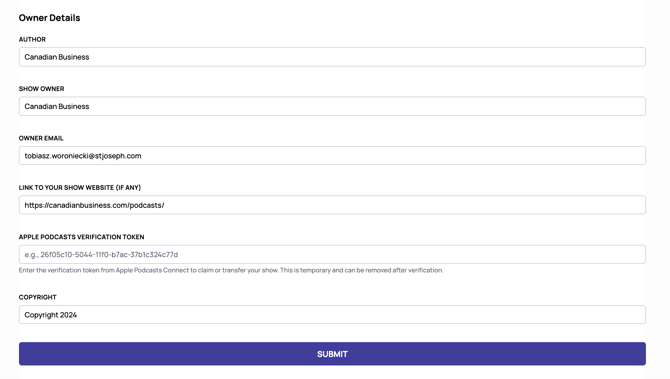
4. Paste the token and click **Submit**.
### **Step 6: Confirmation**
Your show will be added to your Apple Podcasts Connect account within **24 hours**.
- [Getting Started with CoHost](https://help.cohostpodcasting.com/getting-started-with-cohost?hsLang=en-us)
- [Create, import, and modify my podcast](https://help.cohostpodcasting.com/create-import-and-modify-my-podcast?hsLang=en-us#main-content)
- [Podcast Migration](https://help.cohostpodcasting.com/create-import-and-modify-my-podcast?hsLang=en-us#podcast-migration)
- [Editing/Updating My Podcast](https://help.cohostpodcasting.com/create-import-and-modify-my-podcast?hsLang=en-us#editing-updating-my-podcast)
- [Create, publish, and edit my episodes](https://help.cohostpodcasting.com/create-publish-and-edit-my-episodes?hsLang=en-us#main-content)
- [Episode Set Up](https://help.cohostpodcasting.com/create-publish-and-edit-my-episodes?hsLang=en-us#episode-set-up)
- [Episode Publishing](https://help.cohostpodcasting.com/create-publish-and-edit-my-episodes?hsLang=en-us#episode-publishing)
- [Episode Editing](https://help.cohostpodcasting.com/create-publish-and-edit-my-episodes?hsLang=en-us#episode-editing)
- [Distribute my podcast](https://help.cohostpodcasting.com/distribute-my-podcast?hsLang=en-us#main-content)
- [Podcast Fundamentals](https://help.cohostpodcasting.com/distribute-my-podcast?hsLang=en-us#podcast-fundamentals)
- [Listening Apps](https://help.cohostpodcasting.com/distribute-my-podcast?hsLang=en-us#listening-apps)
- [RSS Feed](https://help.cohostpodcasting.com/distribute-my-podcast?hsLang=en-us#rss-feed)
- [General](https://help.cohostpodcasting.com/general?hsLang=en-us)
- [Grow my podcast](https://help.cohostpodcasting.com/grow-my-podcast?hsLang=en-us#main-content)
- [How To's](https://help.cohostpodcasting.com/grow-my-podcast?hsLang=en-us#how-tos)
- [Tips & Best Practices](https://help.cohostpodcasting.com/grow-my-podcast?hsLang=en-us#tips-best-practices)
- [Managing my CoHost account](https://help.cohostpodcasting.com/managing-my-cohost-account?hsLang=en-us#main-content)
- [Adding Features](https://help.cohostpodcasting.com/managing-my-cohost-account?hsLang=en-us#adding-features)
- [Billing](https://help.cohostpodcasting.com/managing-my-cohost-account?hsLang=en-us#billing)
- [Team Members](https://help.cohostpodcasting.com/managing-my-cohost-account?hsLang=en-us#team-members)
- [Multi-Show Management](https://help.cohostpodcasting.com/managing-my-cohost-account?hsLang=en-us#multi-show-management)
- [Prefix](https://help.cohostpodcasting.com/managing-my-cohost-account?hsLang=en-us#prefix)
- [Free Trial](https://help.cohostpodcasting.com/managing-my-cohost-account?hsLang=en-us#free-trial)
- [Troubleshooting](https://help.cohostpodcasting.com/troubleshooting?hsLang=en-us)
- [Understanding my CoHost features](https://help.cohostpodcasting.com/understanding-my-cohost-features?hsLang=en-us#main-content)
- [CoHost Tracking Links](https://help.cohostpodcasting.com/understanding-my-cohost-features?hsLang=en-us#cohost-tracking-links)
- [Automatic Websites](https://help.cohostpodcasting.com/understanding-my-cohost-features?hsLang=en-us#automatic-websites)
- [Automatic Transcriptions](https://help.cohostpodcasting.com/understanding-my-cohost-features?hsLang=en-us#automatic-transcriptions)
- [Audio Insertion](https://help.cohostpodcasting.com/understanding-my-cohost-features?hsLang=en-us#audio-insertion)
- [Websites](https://help.cohostpodcasting.com/understanding-my-cohost-features?hsLang=en-us#websites)
- [Show Analytics](https://help.cohostpodcasting.com/understanding-my-cohost-features?hsLang=en-us#show-analytics)
- [Understanding podcast analytics](https://help.cohostpodcasting.com/understanding-podcast-analytics?hsLang=en-us#main-content)
- [Growth Metrics](https://help.cohostpodcasting.com/understanding-podcast-analytics?hsLang=en-us#growth-metrics)
- [General Analytics](https://help.cohostpodcasting.com/understanding-podcast-analytics?hsLang=en-us#general-analytics)
- [Engagement Metrics](https://help.cohostpodcasting.com/understanding-podcast-analytics?hsLang=en-us#engagement-metrics)
- [Audience Insights](https://help.cohostpodcasting.com/understanding-podcast-analytics?hsLang=en-us#audience-insights)
- [CoHost Updates](https://help.cohostpodcasting.com/cohost-updates?hsLang=en-us)
[](https://www.cohostpodcasting.com)
Robina Avenue, York, ON
[mailto:email@email.com](mailto:email@email.com)
Copyright © 2024, cohostpodcasting.com