---
title: How Do I List My Podcast On Amazon Music and Audible?
description: Follow these simple steps to list your podcast on Amazon Music and Audible.
---
[Skip to content](https://help.cohostpodcasting.com/how-do-i-list-my-podcast-on-amazon-music-and-audible#main-content)
[Submit a Support Request](https://help.cohostpodcasting.com/kb-tickets/new?hsLang=en-us)
[](https://www.cohostpodcasting.com/?utm_source=hubspot&utm_medium=banner&utm_campaign=knowledge-base)
Open main navigation
Close main navigation
- [Submit a Support Request](https://help.cohostpodcasting.com/kb-tickets/new)
How can we help you?
- There are no suggestions because the search field is empty.
1. [CoHost Help Center](https://help.cohostpodcasting.com/?hsLang=en-us)
2. [Distribute my podcast](https://help.cohostpodcasting.com/distribute-my-podcast?hsLang=en-us)
3. [Listening Apps](https://help.cohostpodcasting.com/distribute-my-podcast?hsLang=en-us#listening-apps)
March 12, 2025
# How Do I List My Podcast On Amazon Music and Audible?
## Make your podcast available on Amazon Music and Audible by following the steps below.
Before listing your show on Amazon Music and Audible, you’ll need to create a CoHost account and successfully import your show.
If you haven’t done so already, start a free trial on CoHost using**[this link](https://join.cohostpodcasting.com/).**
- **If you’re adding a brand new show to CoHost**, follow [this support article](https://help.cohostpodcasting.com/how-to-add-a-new-show-to-your-cohost-account?hsLang=en-us).
- **If you’re migrating your show over from a previous hosting platform**, consult our articles below on how to import your podcast to CoHost:
- [Ausha](https://help.cohostpodcasting.com/how-do-i-import-my-show-from-ausha?hsLang=en-us)
- [Captivate](https://help.cohostpodcasting.com/how-do-i-import-my-show-from-captivate?hsLang=en-us)
- [Podbean](https://help.cohostpodcasting.com/how-do-i-import-my-show-from-podbean?hsLang=en-us)
- [Megaphone](https://help.cohostpodcasting.com/how-do-i-import-my-show-from-megaphone?hsLang=en-us)
- [Libsyn](https://help.cohostpodcasting.com/how-do-i-import-my-show-from-libsyn?hsLang=en-us)
- [Acast](https://help.cohostpodcasting.com/how-do-i-import-my-show-from-acast?hsLang=en-us)
- [Simplecast](https://help.cohostpodcasting.com/how-do-i-import-my-show-from-simplecast?hsLang=en-us)
- [Spreaker](https://help.cohostpodcasting.com/how-do-i-import-my-show-from-spreaker?hsLang=en-us)
- [Buzzsprout](https://help.cohostpodcasting.com/how-do-i-import-my-show-from-buzzsprout?hsLang=en-us)
- [Omny Studio](https://help.cohostpodcasting.com/how-do-i-import-my-show-from-omny-studio?hsLang=en-us)
- [Transistor](https://help.cohostpodcasting.com/how-do-i-import-my-show-from-transistor?hsLang=en-us)
- [Spotify for Creators](https://help.cohostpodcasting.com/how-do-i-import-my-show-from-spotify-for-creators?hsLang=en-us)
- [Sounder](https://help.cohostpodcasting.com/how-do-i-import-my-show-from-sounder?hsLang=en-us)
Then, input or verify your show’s details under **“Distribution” \> “Show Settings.”** Here you’ll want the most up-to-date information about your podcast like the title, description, and cover (3000 x 3000 px).
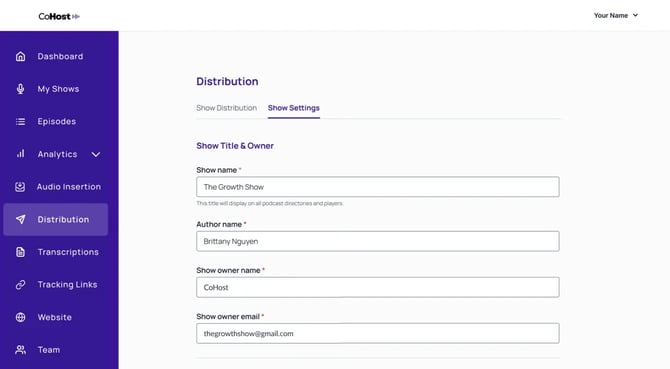
Once the steps above are complete, you’re ready to list your podcast on Spotify. Here’s how:
### 1. Go to [Amazon Music for Podcasters](https://podcasters.amazon.com/)
### 2. Click “Add or Claim Your Podcast”
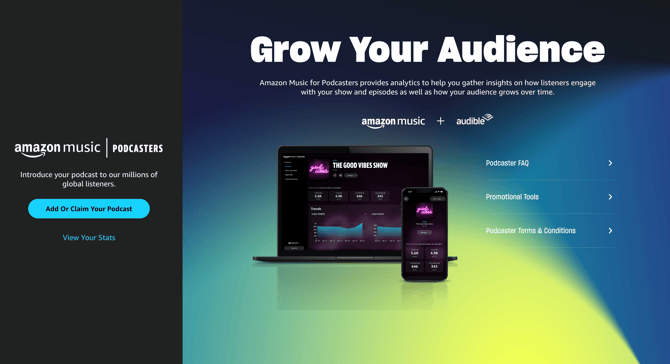
### 3. Connect your Amazon account or create a new one
You’ll want to use an email specific to your podcast to keep everything organized and in one place.
### 4. Enter your RSS feed URL
You can find this by clicking **“Distribution”** in the left sidebar of your CoHost account.
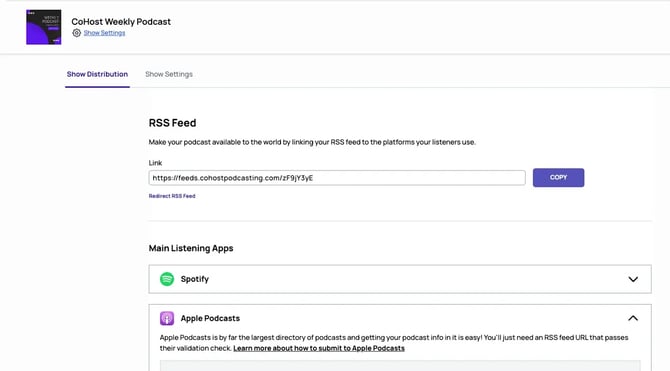
### 5. Verify ownership of your podcast
Amazon will send an email to the address associated with your RSS feed to verify your show. After clicking the link you’ll be taken to the Amazon for Podcasters dashboard where you can check the status of your request.
### 6. Recieve a confirmation email from Amazon
Podcasts are usually available on Amazon Music and Audible within 24 hours of your submission request. Note that you’ll only need to complete the submission process once for your show to be available on both platforms.
- [Getting Started with CoHost](https://help.cohostpodcasting.com/getting-started-with-cohost?hsLang=en-us)
- [Create, import, and modify my podcast](https://help.cohostpodcasting.com/create-import-and-modify-my-podcast?hsLang=en-us#main-content)
- [Podcast Migration](https://help.cohostpodcasting.com/create-import-and-modify-my-podcast?hsLang=en-us#podcast-migration)
- [Editing/Updating My Podcast](https://help.cohostpodcasting.com/create-import-and-modify-my-podcast?hsLang=en-us#editing-updating-my-podcast)
- [Create, publish, and edit my episodes](https://help.cohostpodcasting.com/create-publish-and-edit-my-episodes?hsLang=en-us#main-content)
- [Episode Set Up](https://help.cohostpodcasting.com/create-publish-and-edit-my-episodes?hsLang=en-us#episode-set-up)
- [Episode Publishing](https://help.cohostpodcasting.com/create-publish-and-edit-my-episodes?hsLang=en-us#episode-publishing)
- [Episode Editing](https://help.cohostpodcasting.com/create-publish-and-edit-my-episodes?hsLang=en-us#episode-editing)
- [Distribute my podcast](https://help.cohostpodcasting.com/distribute-my-podcast?hsLang=en-us#main-content)
- [Podcast Fundamentals](https://help.cohostpodcasting.com/distribute-my-podcast?hsLang=en-us#podcast-fundamentals)
- [Listening Apps](https://help.cohostpodcasting.com/distribute-my-podcast?hsLang=en-us#listening-apps)
- [RSS Feed](https://help.cohostpodcasting.com/distribute-my-podcast?hsLang=en-us#rss-feed)
- [General](https://help.cohostpodcasting.com/general?hsLang=en-us)
- [Grow my podcast](https://help.cohostpodcasting.com/grow-my-podcast?hsLang=en-us#main-content)
- [How To's](https://help.cohostpodcasting.com/grow-my-podcast?hsLang=en-us#how-tos)
- [Tips & Best Practices](https://help.cohostpodcasting.com/grow-my-podcast?hsLang=en-us#tips-best-practices)
- [Managing my CoHost account](https://help.cohostpodcasting.com/managing-my-cohost-account?hsLang=en-us#main-content)
- [Adding Features](https://help.cohostpodcasting.com/managing-my-cohost-account?hsLang=en-us#adding-features)
- [Billing](https://help.cohostpodcasting.com/managing-my-cohost-account?hsLang=en-us#billing)
- [Team Members](https://help.cohostpodcasting.com/managing-my-cohost-account?hsLang=en-us#team-members)
- [Multi-Show Management](https://help.cohostpodcasting.com/managing-my-cohost-account?hsLang=en-us#multi-show-management)
- [Prefix](https://help.cohostpodcasting.com/managing-my-cohost-account?hsLang=en-us#prefix)
- [Free Trial](https://help.cohostpodcasting.com/managing-my-cohost-account?hsLang=en-us#free-trial)
- [Troubleshooting](https://help.cohostpodcasting.com/troubleshooting?hsLang=en-us)
- [Understanding my CoHost features](https://help.cohostpodcasting.com/understanding-my-cohost-features?hsLang=en-us#main-content)
- [CoHost Tracking Links](https://help.cohostpodcasting.com/understanding-my-cohost-features?hsLang=en-us#cohost-tracking-links)
- [Automatic Websites](https://help.cohostpodcasting.com/understanding-my-cohost-features?hsLang=en-us#automatic-websites)
- [Automatic Transcriptions](https://help.cohostpodcasting.com/understanding-my-cohost-features?hsLang=en-us#automatic-transcriptions)
- [Audio Insertion](https://help.cohostpodcasting.com/understanding-my-cohost-features?hsLang=en-us#audio-insertion)
- [Websites](https://help.cohostpodcasting.com/understanding-my-cohost-features?hsLang=en-us#websites)
- [Show Analytics](https://help.cohostpodcasting.com/understanding-my-cohost-features?hsLang=en-us#show-analytics)
- [Understanding podcast analytics](https://help.cohostpodcasting.com/understanding-podcast-analytics?hsLang=en-us#main-content)
- [Growth Metrics](https://help.cohostpodcasting.com/understanding-podcast-analytics?hsLang=en-us#growth-metrics)
- [General Analytics](https://help.cohostpodcasting.com/understanding-podcast-analytics?hsLang=en-us#general-analytics)
- [Engagement Metrics](https://help.cohostpodcasting.com/understanding-podcast-analytics?hsLang=en-us#engagement-metrics)
- [Audience Insights](https://help.cohostpodcasting.com/understanding-podcast-analytics?hsLang=en-us#audience-insights)
- [CoHost Updates](https://help.cohostpodcasting.com/cohost-updates?hsLang=en-us)
[](https://www.cohostpodcasting.com)
Robina Avenue, York, ON
[mailto:email@email.com](mailto:email@email.com)
Copyright © 2024, cohostpodcasting.com